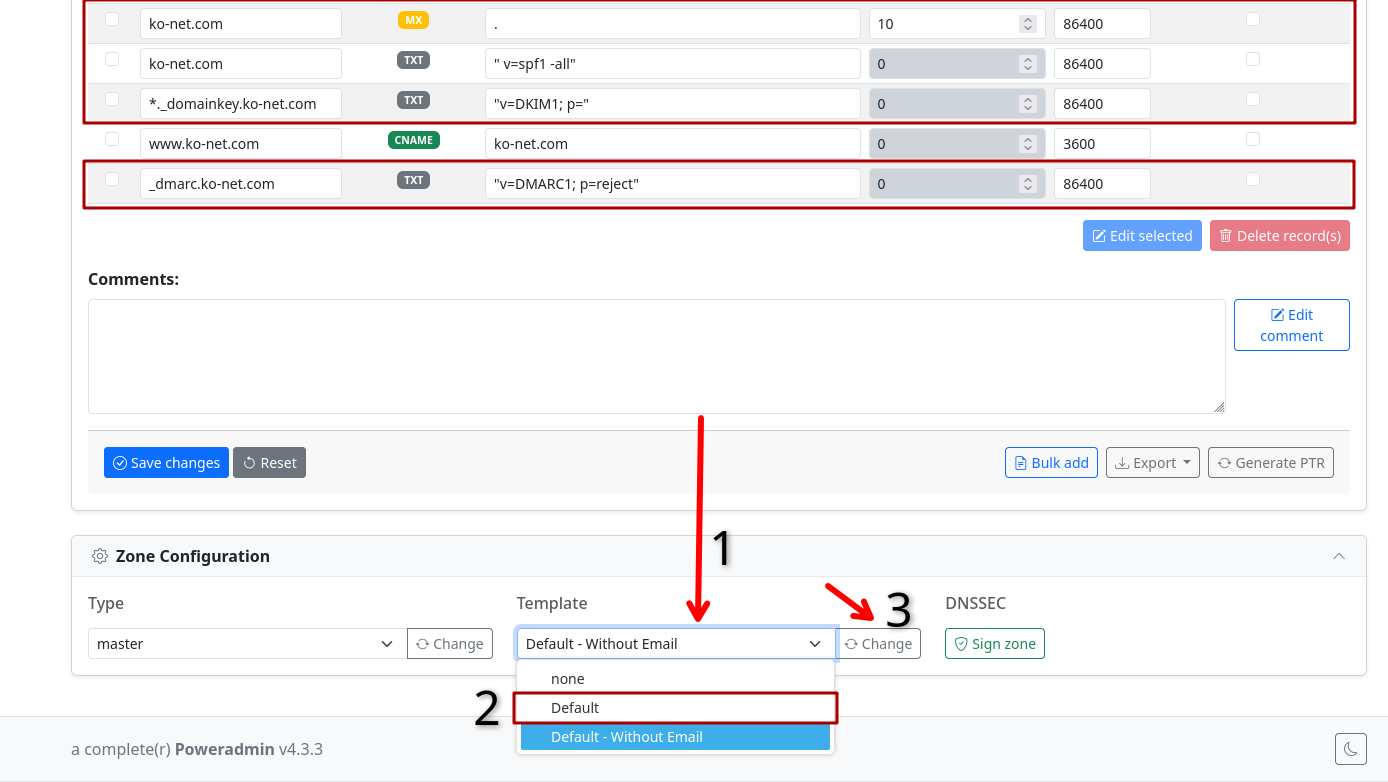
For any customer using our DNS service, we have run a batch change on all zones.
Anyone who does not have any MX records set, will automatically have a default mail template applied which prevents the domain being usable for unauthorised email.
We now set the following records by default if you are not using email from us:
[ZONE] - MX  - . - 10 (Do not accept incoming mail)
[ZONE] - TXT  - "v=spf1 -all" (Prevent forgery of envelope sender)
_dmarc.[ZONE] - TXT - "v=DMARC1; p=reject" (Invalidate all keys, including those used by the previous holder of the domain)
*._domainkey.[ZONE]  - TXT  - "v=DKIM1; p=" (Invalidate all keys, including those used by the previous holder of the domain)
This does not apply to domains with any existing MX record, so if you were using email already from us or other companies, there is no changes.
If you need to add email to your domain, please change the template for your domain from "Default - Without Email" to just "Default", which can be found under the Zone Configuration tab below the records.